System Setup
Configuration Mode
- In the interest of moving the configuration aspects of the system to a more centralized location, we have overhauled the System Setup screen creating a “Configuration Mode”.
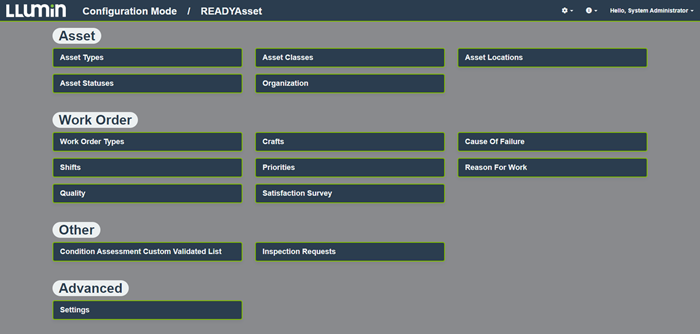
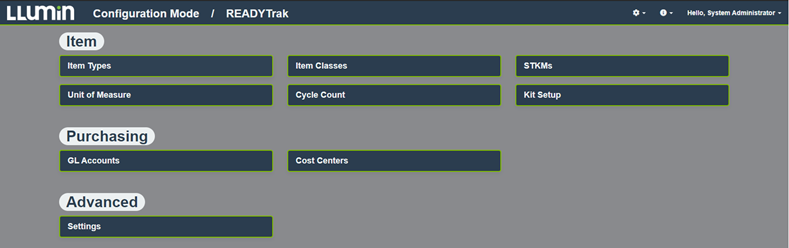
Please refer to the screenshot below.

- The Configuration Mode is grouped to show the modules that have been purchased:
- READYAsset which includes Assets and Work Orders.
- READYTrak which includes Purchasing and Inventory.
- READYConnect which includes configurations for Financial System Integrations.

-
- READYManage which includes User Certifications, Projects, and Workflows.

-
- System-Wide which includes field captions, label printer settings and other settings that affect multiple aspects of the system.

- Some of the major changes include:
- Migrating the Asset Classes/Types, Work Order Types, Item Classes/Types to be under the Configuration Mode.
- Greatly enhancing the configuration screens for objects previously managed under System Setup for increased usability.
- We have added more auditing to track changes to the system configurations. There is an Audit button on the Settings card under each module which contains the activity log of all changes made to those settings.
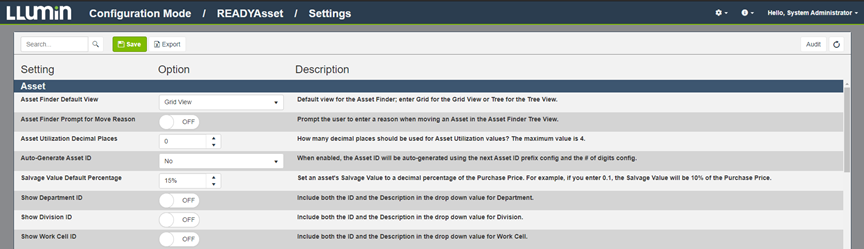
- There is now a Settings option for each module containing the settings that are applicable to that module which is a change from the previous System Configuration screen which combined all system configurations into one list.
- As part of the changes to the Settings screen, we have given the screen an enhanced look and feel.
- We have also included a description of each setting giving a short overview. For the more advanced settings, we will provide a link to an article on the LLumin Support Portal outlining the effects of the setting change.
Here is a sample of the READYAsset Settings screen:
Minor Changes
- We have added additional validation when a user attempts to delete a User Role that has Users linked to it preventing deletion accompanied by a blue banner message indicating the Role is in use.
- We have addressed an issue preventing the Item Description from loading properly in the Asset Linked Parts card.
- We have addressed an issue preventing Vendor Phone Numbers from loading on the Purchase Order screen.
- We have addressed an issue within the Asset Facility View and the Asset’s current status will update as expected.