**See attached PDF of Release Notes
Application Set-Up / Configurations / General
Application Update
Title: Banner Messages for LLumin Notices
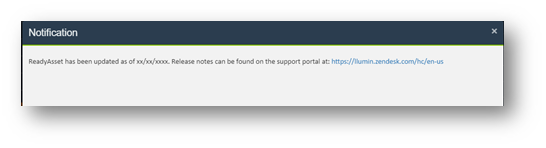
- When software updates are introduced, a Banner Message will appear on the homepage of the software.
- This message will announce the date of the update as well as a link to the Support Portal (https://llumin.zendesk.com) where Release Notes will be housed going forward.
- The message will appear just once, the first time a user logs in after the Banner has been posted.
- This Banner Message will be used initially to announce Monthly Maintenance Releases but could be used more broadly going forward.
READYAsset
Asset Improvements
Title: Asset Finder Manufacturer Column Fix
- The Manufacturer Column in the Asset Finder is now showing the Manufacturer Name, not the Manufacturer ID.
Work Order Improvements
Title: Import Duplicate Entries
- When adding duplicate records for labor time or equipment usage, the validation will fail and inform you why.
Title: Deleting Work Orders
- For a Work Order with required parts (but no issued parts or labor time) you are now able to delete it.
- The “delete alert message” was modified to add that Work Orders cannot be deleted when there is associated labor or parts usage.
Title: No Due Date for a Down Work Order
- Enabled functionality to leave the due date blank on a downed Work Order.
Title: Next Button Entering Labor Time
- The “Next” button on the Labor Time Completion pop-up did not consistently work as expected. This issue has been fixed.
Title: Reopen “Closed Not Complete” Work Orders
- You are now able to reopen Work Orders with a status of “Close Not Complete”.
Title: “Email When Down" functionality in Asset Master
- When an Asset’s status changes from a non-down status to a down-status, emails will be sent if the “Notification Email Address” and “Email When Down” fields are specified in the Asset Master.
READYTrak
Inventory Module Improvements
Title: Inability to Delete an Unused Item Class from Details
- A user is now able to delete an unused Item Class.
Title: Default the “Issue to” when issuing inventory
- A configurable option has been added that when turned on, would set the “Issue To” field to the currently logged in user.
- When the configuration is turned off, the field will be blank.
Purchasing Improvements
Title: Duplicate Vendors
- If you attempt to create a vendor that already exists, the application will provide a meaningful, detailed error message.
Title: Auto Create Purchase Orders
- Once the last approval on a Purchase Requisition is satisfied, the Purchase Order is created.
- This is a user configurable option called “AutoCreatePOFromApprovedReq”.
The resulting Purchase Order is finalized.
-
- This is a user configurable option called “AutoFinalizePOFromReq”.
The Workflow Module is evaluated on Purchase Orders built from Requisitions.
-
- This is a user configurable option called ReqApprovalOnReqPOs
Title: Vendor Drop Down
- The Purchase Order Entry Screen’s Vendor drop-down includes both Vendor Class SUPPLIER and Vendor Class VENDOR.
Modules & Interfaces
Title: Workflow Module Compatibility * Firefox Browsers Only
- Approval buttons now appear as you would expect in the Workflow approval process.