Asset and Work Management
Work Order Type Management:
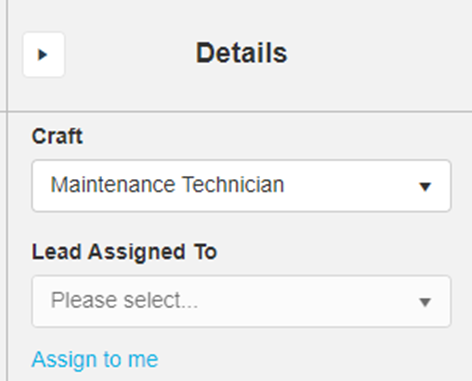
- We have added functionality to allow users without Assign permissions to assign Work Orders to themselves through an “Assign to me” link as shown below.
- We have updated the Work Order grid for Purchase Order details; the Purchase Order Number field is now a clickable link to open the relevant Purchase Order record.
- We have addressed an issue causing the “Elapsed Time” on the Work Order Summary card to calculate incorrectly.
- We have addressed an issue causing the Sub Reasons dropdown to be hidden in certain circumstances.
Asset Management
- We have updated the Performance History grid; the Work Order Number field is now a clickable link to open the relevant Work Order record.
- We have addressed an issue when Assets were re-coded that caused the attachments to unlink.
- We have addressed an issue that caused two fields to show without captions under the Financial Info card in certain circumstances.
Inventory Control & Item Tracking
Item Tracking
- We have added a “Go Back” button within the quick bar on Item records that will bring the user back to the Item Finder or previous screen as applicable.
Homepage
Filters
- We have added functionality to allow Homepage filters to persist when a user navigates away from the Homepage and back to it.
Minor Improvements
- The menu cards under Configuration Mode have been recaptioned from “READY…” to align better with overall module licensing nomenclature.
- We have addressed an issue preventing Certification expiration notifications from being sent in certain circumstances.
- We have improved the look of the GL Accounts screen under the Configuration Mode menu to allow better use of the available page size.
- We have addressed an issue within the Issue Finder causing Ext Price to show multiplied erroneously.
- Various enhancements, color scheme changes, defect fixes and performance improvements.