LLumin January 2020 Maintenance Release Notes
READYAsset
We have added functionality to allow users to multi-select Items in Asset Master Linked Parts Card and multi-select Assets in the Item Master Linked Assets Card.
READYTrak
1. Items can now be added to multiple Cycles for Inventory Cycle Count, per stockroom.
2. New fields have been added to the Issuing Finder – “Mfg Part #” and “Alt Part 1” are now available.
3. Users can now change and save personal grid layouts in multiple screens.
- Details
- Screens in the application where this is now present include Receiving, Reorder List, PO Lines, PO Receipts, Transfer Finder/Details, Issue Items, Serial # Finder, and Cycle Count Approval.
- This can be accessed using the gear icon in the top right corner of the grids that will pull up the Column dialog and allows the user to reorder the columns. It will also save visibility and sorts as your default grid layout and will load on subsequent page loads.
New Functionality
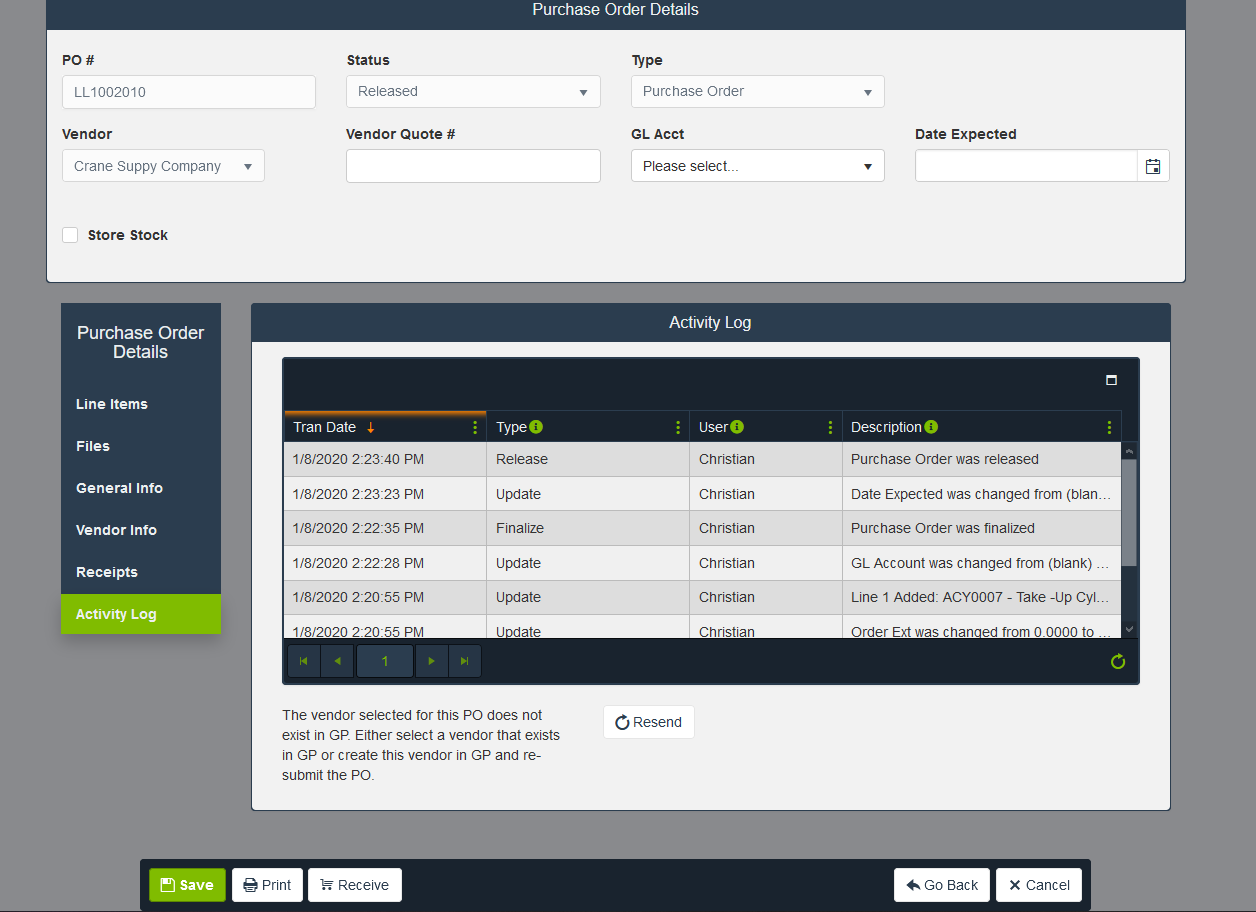
Significant improvements have been made to the Financial Integration module to allow users to get real time feedback from the Microsoft GP system when a PO fails to send.
- Details
- We have added a field to address conflicts with multiple GP integrations called Accounting Vendor ID
- We have added more user-friendly rejection messages explaining in understandable terms why GP rejected the PO, translating the native GP message into something clearer, with recommended action.
- Display successful submission / rejection message from GP to PO Detail - Activity card for that PO so users can see if their PO made it to GP without needing admin rights and know how to solve immediately.
- Change interface to not continue to auto-resend PO’s rejected by GP
- Added Re-send action to PO Detail screen to force a re-send to GP so user can fix the data and re-send it to GP.
Please see the example below which illustrates some of the new functionality:
General Updates
- We have reconfigured the QZ-Tray installer to be a “one-click” installer to allow our users to more quickly install the QZ-Tray which is necessary to use the Zebra label printers. This installer can be downloaded from the System Set Up screen.
- We have added three new optional system configurations:
- Option to suppress printing Purchase Orders during the release process
- Option to change the default value of the "Performed By" field when entering or updating a Work Order, option can be set to the “Assigned To” or the currently logged in user.
- Option to choose available value for the WO completion time/date. The value can either be to complete on “Labor End” which is the default value and the “Current Time”
If you are interested in changing these settings please reach out to the LLumin READYSupport Team by either emailing support@llumin.zendesk.com or by calling (413)-233-5434.
**Please note that minor fixes and/or cosmetic updates are also included in this release.**